
Every 3D printer operator has a graveyard. A box (or shelf, or drawer) of prints that didn't make it. Spaghetti tangles. Warped bases. Even printer poop 💩. That thing that was supposed to be a phone stand but ended up looking like modern art.
We've been running our Bambu Lab A1 and Prusa MK3.5 at Maker Pub for a while now, and we've hit most of the common failures ourselves. Here's what went wrong, why, and what we did about it.
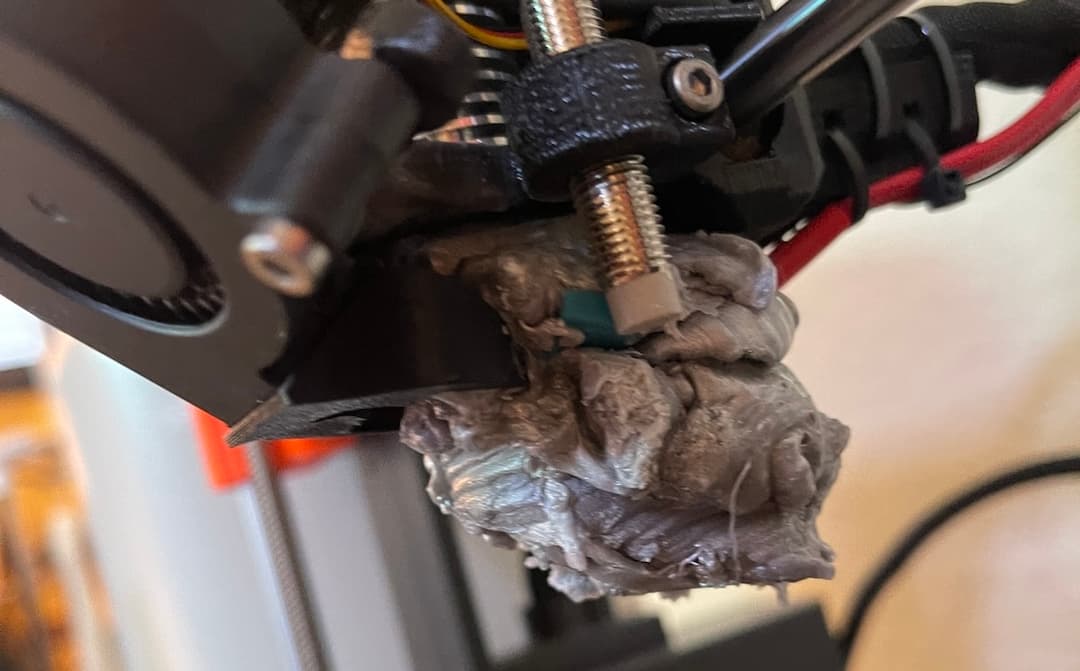
The Blob of Death
After a couple successful runs getting my printer set up, I figured I had the basics down. Started a larger print before bed. Woke up expecting a finished piece, found a massive blob of melted filament that had completely covered the nozzle. It encases the extruder, cools into a hard shell, and looks like the printer tried to eat itself. I was worried I'd damaged it beyond repair on day one.
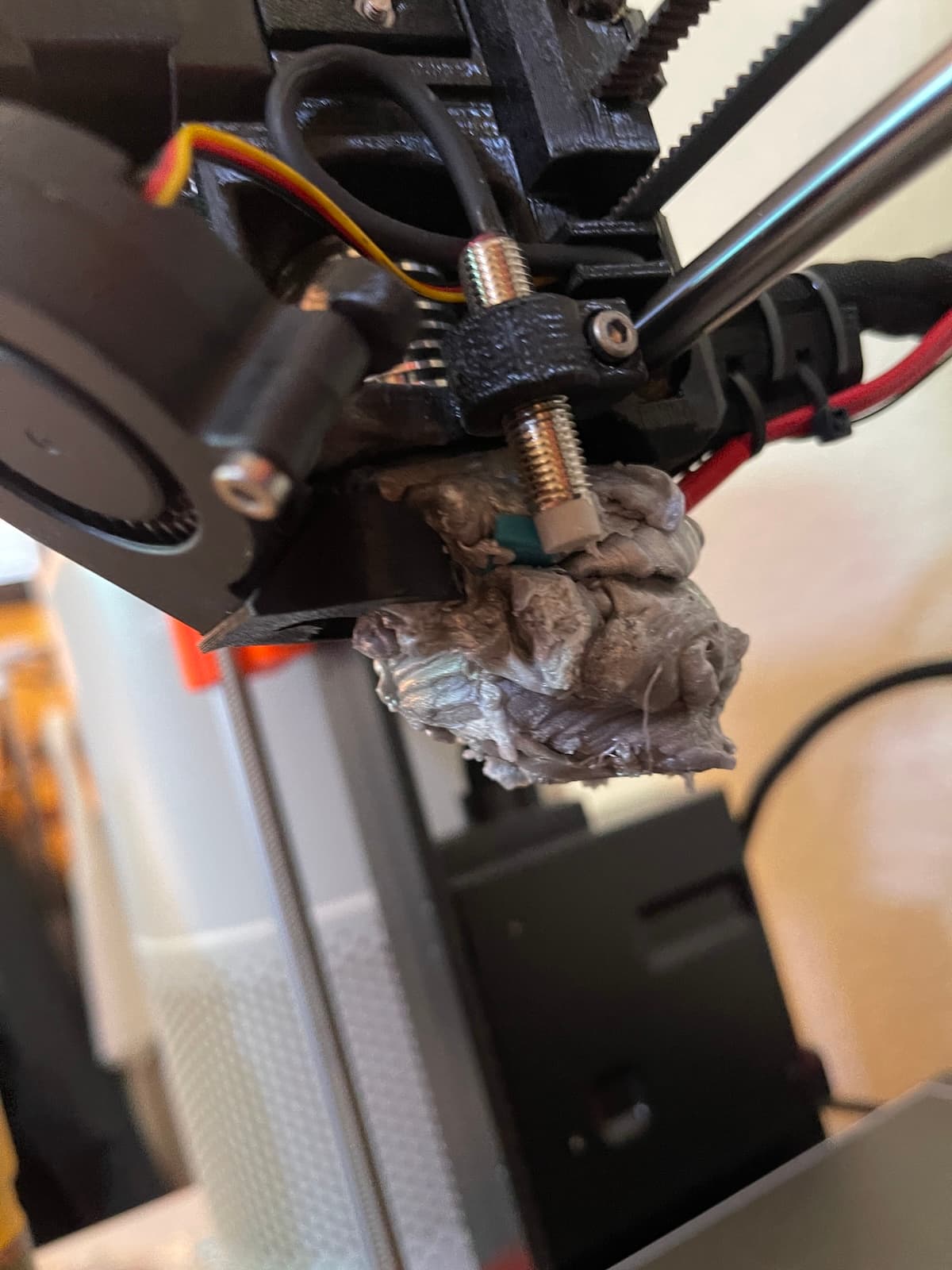
Here's what happens: the print detaches from the build plate mid-print. In this case, the end of the print didn't have good bed adhesion so it curled up, caught on the nozzle, and got pulled off the bed. The nozzle keeps extruding filament, but now there's nothing to print onto. Molten plastic accumulates around the nozzle, cooling and hardening into a blob that can encase the entire hotend assembly. On the Prusa MK3.5 this can get bad fast. Newer models have built-in detection for this, but the MK3.5 doesn't.
Why it happens:
- Poor first-layer adhesion (the print peels off during a fast move)
- The nozzle catches an edge of the print and knocks it loose
- Filament quality issues causing inconsistent extrusion
How to prevent it:
- Make sure your first layer is dialed in. Watch those first few layers before walking away or going to bed to leave it overnight.
- Clean the build plate before every print. Fingerprints and dust kill adhesion. You can use soap and water or isopropyl alcohol above 90% with a microfiber cloth to clean the bed, just make sure it's cool before doing so.
- Use the webcam if your printer has one built in (the Bambu Lab A1 does), or add one if it doesn't. Check on your print remotely instead of assuming it's fine.
- For prints with small footprints, add a brim in your slicer. It's a thin border around the base that gives the print more grip on the plate. This can be enabled in the slicer and helps prevent this type of issue if the printed part is narrow like a pointed tip.
How to fix it:
- Heat the nozzle to the high end of the filament's range (250°C for PLA). This softens the blob enough to pull it off.
- Clean up residue gently with a wire brush.
- Inspect the cables for damage and replace anything that looks compromised.
I tried a heat gun on low first, pulling off pieces bit by bit. It wasn't great. Heating the nozzle directly is what actually worked.
If you catch the blob early, cancel the print immediately. A small blob is a minor cleanup. A full blob can require disassembling the hotend or replacing parts if they become damaged. I learned that the hard way!
Bed Adhesion Failures
Your print starts fine, then 20 minutes in you hear a scraping sound. The print has popped off the plate and the nozzle is dragging it around. We see this one more than anything else during open lab.
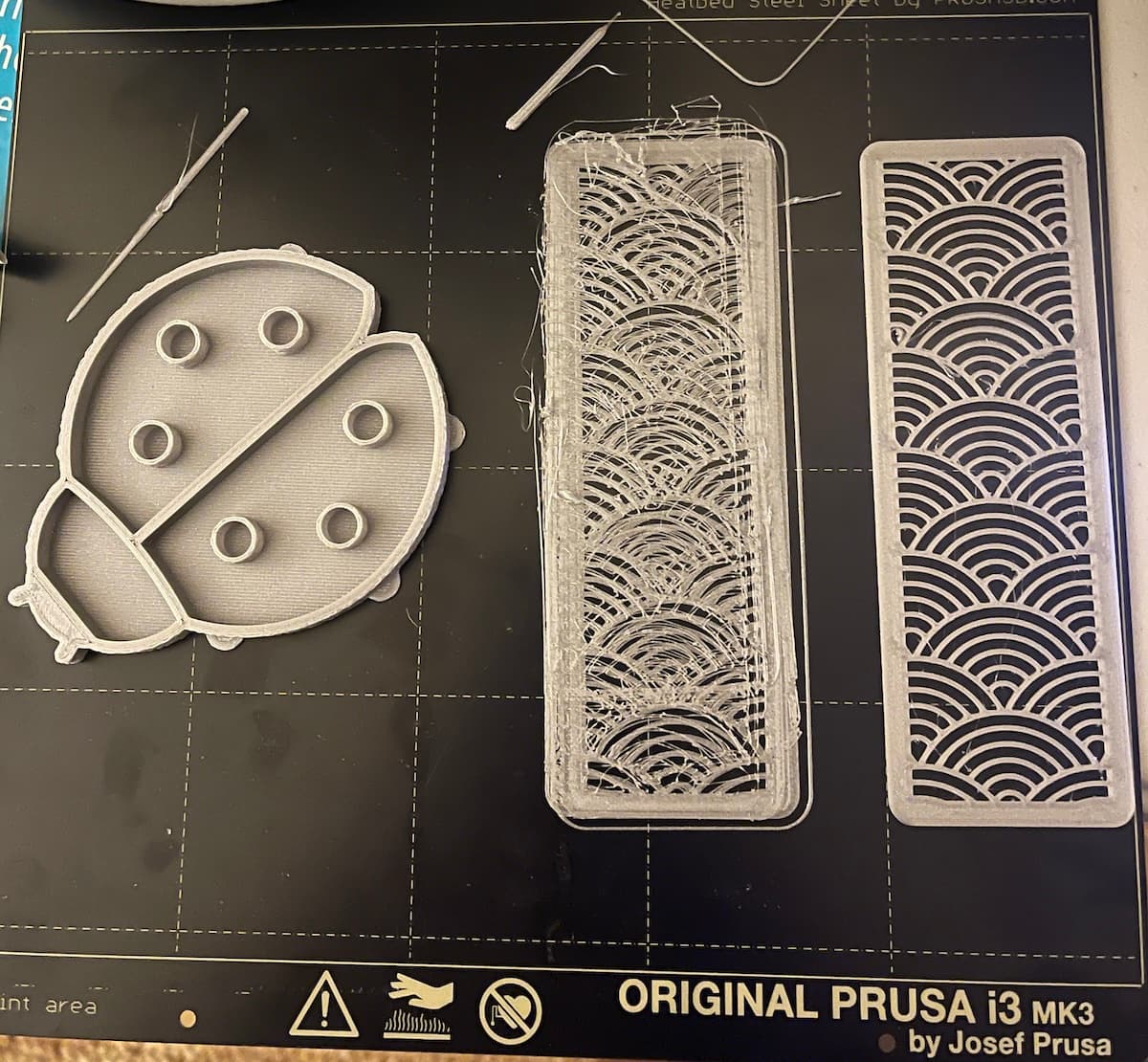
The good news: it's usually the easiest to fix.
Why it happens:
- Dirty build plate. Oils from your fingers, dust, residue from previous prints.
- First layer too high. If the nozzle is too far from the plate, the filament doesn't squish down enough to grip.
- Wrong bed temperature for the material.
- Printing on a smooth plate without enough surface texture for the filament to grab.
How to fix it:
- Wipe the build plate with isopropyl alcohol (IPA) before every print. This alone fixes most adhesion issues.
- Run the auto-calibration on the Bambu Lab A1. It handles bed leveling and Z-offset, but it's worth re-running if you've moved the printer or changed the plate.
- For PLA, a bed temp of 55-60°C works well. PETG likes it a bit warmer, around 70-80°C.
- Use a textured PEI sheet. PLA grips textured PEI really well, and prints pop off cleanly once the plate cools.
Stringing
You pull your print off the plate and there are thin wisps of filament stretched between every feature. It won't ruin the print, but it's annoying to clean up and makes everything look rough. Our first PETG prints were covered in it.
Why it happens:
- During travel moves (when the nozzle moves between parts without extruding), a small amount of filament oozes out. That ooze hardens into thin strings.
- Wet filament is the biggest culprit. PLA and especially PETG absorb moisture from the air, and wet filament oozes more.
- Nozzle temperature too high for the material.
How to fix it:
- Lower the nozzle temperature by 5°C increments. Find the lowest temp that still gives good layer adhesion.
- Increase retraction distance and speed in your slicer. Retraction pulls filament back into the nozzle during travel moves, reducing ooze. Bambu Studio's defaults are decent, but you can bump retraction distance to 1-2mm for the A1.
- Dry your filament. If PLA has been sitting out for weeks, it's probably absorbed enough moisture to cause stringing. A food dehydrator at 45°C for 4-6 hours does the trick.
- If you still have some wispy stringing and want a quick fix, you can also use a heat gun to remove them. Just make sure you do this in a well-ventilated area. The best way to handle this is in the print settings if possible to reduce the labor required for the post-processing step.
Print a retraction test tower to dial in your settings. It's a quick print that shows stringing at different retraction values, so you can find the sweet spot without wasting hours on full prints.
Warping
The corners of your print lift off the bed and curl up. The print might finish, but it won't sit flat. We ran into this trying to print a large flat base for a display stand; looked fine for the first hour, then the edges started peeling.
Why it happens:
- As each layer cools, it contracts. If the bottom layers cool faster at the edges than the center, the corners pull up.
- This is especially bad with ABS and ASA, which have high shrinkage rates. PLA is much more forgiving.
- Drafts, air conditioning vents, or fans blowing on the printer make it worse.
How to fix it:
- Start with PLA. It has the lowest warping tendency of common filaments.
- Use a heated bed at the right temp (55-60°C for PLA).
- Add a brim in your slicer. The extra material at the base holds the corners down.
- Keep the printer away from drafts. If you're printing ABS or ASA, you need an enclosure.
- For large flat prints, consider using a raft instead of a brim. Rafts add a thick base layer under your print that absorbs warping stress.
What to Do When It Happens
The instinct is to let a failing print run, hoping it'll somehow fix itself. It won't. A print that's gone wrong at layer 10 isn't going to look better at layer 200. You're just burning filament and time.
Cancel early. If you see spaghetti, a layer shift, or the print detaching, stop it. Filament costs money. Print time costs more.
Check the camera. The Bambu Lab A1 has a built-in camera with timelapse. Check on your print from your phone, especially during the first 30 minutes. Most failures happen in the first few layers.
Ask for help. At Maker Pub, staff are around during open lab to help troubleshoot. Bring your failed print, we'll figure out what went wrong and adjust the settings for the next attempt. A second pair of eyes catches things you'd miss on your own.
Keep a failure log with photos. This sounds excessive but it's useful. Note what failed, what settings you were using, and what fixed it. After a few entries, patterns emerge. You'll stop making the same mistake twice. You can record this in a tool like Notion or just a Google doc.
It Gets Better
Everyone who's good at this went through the same box of failed prints. The difference is just reps.
If you want to troubleshoot hands-on, our 3D Printing Crash Course covers failures and fixes in person. You get time on our printers with staff who've dealt with all of this. Or check out our beginner's guide for slicer tips and material recommendations.